

Setting up an AI phone receptionist sounds complicated. It's not. Most home services companies go live in less than a week. The hard part is deciding to make the switch and choosing a provider, not the actual setup.
If you're running an HVAC, plumbing, roofing, or pest control business, you already know the problem. Phone calls come in all day. Some are urgent. Some can wait. All of them need answers. An AI receptionist handles them without breaks, vacation days, or training costs.
Why home services businesses need an AI phone receptionist
Customers calling home services companies want answers fast. Research shows that 77% of customers expect to reach someone right away when they contact a company. When they hit voicemail or wait on hold, they call the next contractor on their list.
The best AI receptionist gives your business instant availability. It picks up every call on the first ring. It knows your services, pricing, and availability. It books appointments without putting anyone on hold. For home services, that means capturing jobs you would otherwise lose.
Here's what makes the difference.
- Calls get answered 24/7 without hiring night staff.
- Booking happens automatically while you're on job sites.
- Emergency calls get routed to the right person immediately.
- Routine questions don't interrupt your techs anymore.
According to Vena Solutions, companies investing in automation see an average 22% reduction in operating costs. For home services businesses drowning in calls, those savings show up fast.
What happens before you start setting up
A good setup starts with understanding what you need. Don't overcomplicate this. Most home services companies need three things from their AI phone agent for home services.
1. Call answering and routing
Every call gets picked up. Simple questions get answered. Complex issues go to the right person. Emergency calls get flagged instantly.
2. Automated booking with voice AI
Customers tell the AI what they need. The AI checks your calendar. It books the appointment and confirms everything with the customer. No back and forth. No missed slots.
3. CRM and dispatch integration
Every call is logged automatically. Customer details are updated in real time. Your team sees what they need without manual data entry. When this setup is done right, a voice AI answering service with CRM integration becomes a central part of your operations, not just a call-handling layer..
Before you start, write down these details.
- What services do you offer?
- What are your service areas?
- What's your typical pricing or price ranges?
- How do you want emergency calls handled?
- Which calendar or dispatch system do you use?
The clearer you are on this, the faster the setup goes.
Step 1: Pick the right AI phone receptionist platform
Not all platforms work the same. Some are built for generic businesses. Others focus on home services specifically. For plumbing, HVAC, roofing, solar, or pest control, you want a platform that understands your industry.
Look for these features:
Industry-specific knowledge
The AI should know home services terminology. It needs to understand the difference between a routine service call and an emergency. Generic platforms struggle with this.
Integration with your tools
Your AI receptionist needs to connect with whatever you're already using. ServiceTitan, Jobber, Housecall Pro, or other dispatch software should integrate without custom coding. If you're using ServiceTitan, check out the best virtual receptionist for ServiceTitan to see what proper integration looks like.
Customizable call flows
Every business handles calls differently. The AI should follow your process, not force you into theirs. You need control over what questions get asked and how calls get routed.
Transparent pricing
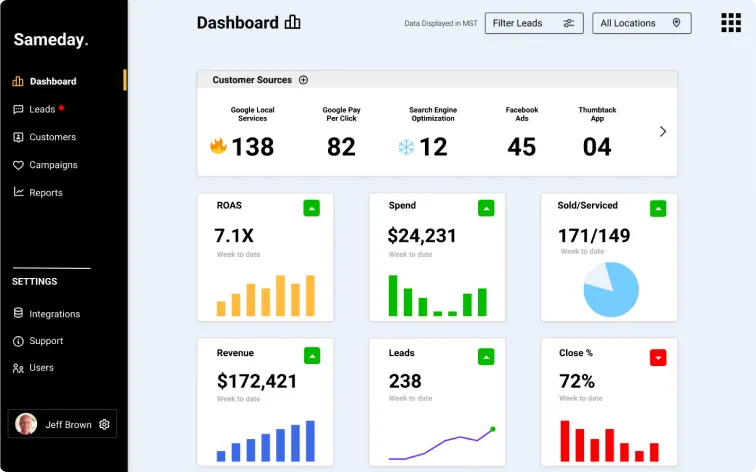
Avoid platforms with complicated pricing or hidden fees. Flat-rate or clear usage-based pricing works better than per-call or per-minute models that spike during busy times. Clear pricing structures, like Sameday’s pricing plans, make it easier to forecast costs and scale without unpleasant surprises.
Step 2: Configure your business information
Once you pick a platform, configuration starts. This is where you teach the AI about your business. Most platforms make this simple with forms or guided setup.
You'll input basic details.
- Business name and contact information.
- Services offered with brief descriptions.
- Service areas or zip codes you cover.
- Operating hours and after-hours handling.
- Emergency vs. non-emergency criteria.
Some platforms let you upload documents or link to your website. The AI reads this content and learns your business faster. The more detail you provide, the better it performs.
Step 3: Connect your phone system
Voice AI implementation requires connecting your existing phone number to the AI platform. This sounds technical but usually isn't.
Most platforms offer two options.
Call forwarding
Forward your business line to the AI system. When calls come in, the AI answers. If it can't handle something, it transfers to you. Simple and fast.
Number porting
Move your existing number fully to the AI platform. This gives you more control and better analytics. Takes a few days but worth it for most businesses.
Either way, you keep your phone number. Customers don't notice any change on their end.
Step 4: Set up calendar and booking integration
Automated booking only works if the AI can see your schedule. Integration connects your calendar or dispatch software to the AI platform.
For most home services companies, this means connecting to platforms like ServiceTitan, Jobber, or Housecall Pro. The AI reads real-time availability, books appointments into open slots, and prevents double-bookings.
You'll define booking rules during this step.
- How far in advance can customers book?
- What's the minimum time between jobs?
- Which services require longer appointment windows?
- How should emergency calls be handled differently?
Good automated phone systems for home services make this configuration straightforward with pre-built templates.
Step 5: Create your call handling workflows
Call flows tell the AI how to handle different scenarios. Think of these as scripts, but flexible ones that adapt to what customers say.
You'll create flows for common situations, like:
New customer calling for service
The AI greets them, asks what service they need, checks availability, and books the appointment. It collects their contact information and confirms everything before ending the call.
Existing customer with a question
The AI looks up their account, answers basic questions about past service or upcoming appointments, and offers to connect them with someone if needed.
Emergency call
The AI recognizes keywords like "flooding," "no heat," or "urgent." It immediately notifies your on-call tech and provides customer details. No delays.
After-hours call
The AI explains your hours, offers to book a next-day appointment, or routes emergency calls to your on-call team.
Most platforms provide templates for these scenarios. You customize them to match your business. Don't overthink this. Start simple and refine as you go.
Step 6: Test everything before going live
Never skip testing. Make test calls yourself. Have your team make test calls. Try different scenarios.
- Call during business hours and ask to book a service.
- Call after hours with an emergency.
- Ask the AI receptionist questions it might not know.
- Try booking multiple services in one call.
- See what happens if you give incomplete information.
Fix anything that doesn't work right. Adjust wording that sounds unnatural. Make sure transfers work smoothly. Confirm appointments show up in your calendar.
Testing reveals issues before customers experience them.
Step 7: Train your team on the new system
Your team needs to understand how the AI works and what it can do. This doesn't take long, but it's important.
Cover these points.
- How the AI answers calls and books appointments.
- How to check calls the AI handled.
- When and how the AI escalates to humans.
- How to update the AI if services or pricing change.
- Where to find call recordings and transcripts.
Make sure someone on your team owns the AI system. They should know how to make quick adjustments and who to contact if something breaks.
Step 8: Go live and monitor performance
Launch day is usually quiet. The AI starts handling calls. You monitor what happens. Most businesses run the AI alongside their existing process for a few days to build confidence.
Watch these metrics in the first week.
- Answer rate. Is the AI picking up every call?
- Booking accuracy. Are appointments landing in the right slots?
- Customer feedback. Are people satisfied with the experience?
- Escalation rate. How often does the AI need to transfer to a human?
Expect some fine-tuning. You might adjust call scripts, tweak booking rules, or add more FAQ responses. This is normal. Lead capture with voice AI improves as the system learns your business.
How long does the setup of an AI phone receptionist take?
Most home services companies complete the setup in 3 to 7 days. Larger operations with complex processes might take two weeks.
The timeline breaks down like this.
Companies with simple processes and clean data move faster. Those with custom needs or multiple locations take longer.
How does AI compare to other options?
Home services businesses have several options for handling calls. Here's how they stack up.
For a detailed comparison, see this cost analysis of AI receptionist vs. human receptionist vs. answering service.
Getting started with your AI phone receptionist
Setting up an AI phone receptionist for home services doesn't require technical expertise. The process is straightforward. Pick a platform built for your industry. Configure your business details. Connect your phone and calendar. Test everything. Go live.
The result is 24/7 phone coverage that books appointments automatically, captures every lead, and costs a fraction of traditional solutions. Your team stops wasting time on routine calls. Your customers get instant answers.
For home services businesses ready to stop missing calls and start capturing more jobs, AI phone receptionists deliver fast results without the complexity.
Ready to see how it works for your business? Get started with Sameday and go from setup to live calls in less than a week.


.svg)
.svg)