

Picking software for your HVAC business is one of those decisions that feels bigger than it should be. There are dozens of platforms competing for your subscription, most of them promising to solve everything at once. In practice, the right choice comes down to your team size, your budget, and what you are actually trying to fix.
This guide cuts through the noise. It covers the five platforms small HVAC businesses use most in 2026, what each one genuinely does well, where each one falls short, and how to match the right tool to where your business is right now.
Quick Answers and Key Takeaways
The best HVAC software for small businesses in 2026 depends largely on team size:
- 1–5 technicians: Jobber is the easiest and most affordable option for scheduling, dispatching, invoicing, and payments.
- 5–10 technicians: Housecall Pro offers stronger customer communication and marketing automation while remaining easy to manage.
- 5–20 technicians: Service Fusion provides more advanced dispatching and reporting without enterprise-level complexity.
- Accounting-focused HVAC companies: FieldEdge offers the strongest QuickBooks integration and financial workflows.
- 15+ technicians or $2M+ revenue: ServiceTitan delivers the deepest reporting and automation but is often excessive for smaller operations.
For most HVAC businesses with fewer than 10 technicians, Jobber and Housecall Pro are the strongest overall choices because they balance affordability, ease of use, implementation speed, and core field service management features.
One important limitation
All HVAC field service management (FSM) platforms help manage booked jobs, but none solve missed inbound calls on their own. If your team frequently misses calls during business hours or after hours, an HVAC answering service may be needed alongside your FSM software.
What type of software should small HVAC businesses look for?
Before comparing platforms, it helps to be clear about what a small HVAC operation actually needs from software.
The list is shorter than most vendor pages suggest.
- Scheduling and dispatch: Drag-and-drop job assignment, real-time technician tracking, and the ability to handle same-day changes without creating chaos
- Invoicing and payments: Fast invoice creation in the field, card-on-file capability, and QuickBooks integration if you already use it for accounting
- Customer records: A CRM that logs service history, equipment details, and communication so your team always has context on a call
- Mobile app: Technicians need to see job details, upload photos, collect signatures, and get paid without going back to the office
- Reporting: Basic visibility into revenue, outstanding invoices, and technician performance
Beyond these core functions, the questions that actually separate platforms at the small-business level are price, implementation time, and how steep the learning curve is. A system that takes six months to set up is not a good fit for a five-person crew that needs to keep running while they migrate.
The five main HVAC software platforms compared
Here is how the major options stack up across the features that matter most for small HVAC businesses.
Pricing figures above reflect publicly reported data and user-reported costs as of mid-2026. ServiceTitan and FieldEdge do not publish pricing; figures are based on widely reported industry sources.
Jobber: the straightforward option for small teams
Jobber is consistently the top recommendation for HVAC operations with one to ten technicians. The platform handles scheduling, quoting, invoicing, payments, and basic CRM in one place, and most teams are fully running within a week of signing up.
Pricing: Solo plans start at $29 per month with annual billing ($39 monthly). Team plans run from $149 per month for up to five users up to $529 per month for 15 users, with extra users at $29 each. A 5-person team pays $129 per month on the Connect Team plan. Note that card processing fees of 2.9% plus $0.30 per transaction apply on top of the subscription.
What Jobber does well:
- Fast setup with minimal training required
- Strong mobile app (rated 4.8 out of 5 on iOS)
- Route optimization added in 2025, which saves meaningful time on multi-stop days
- Clean client communication tools including automated reminders and follow-ups
Where it falls short:
- Reporting depth is limited; it does not give granular tech-level P&L visibility
- QuickBooks integration is only available on the Connect plan and above
- No built-in phone answering; missed calls while techs are on jobs go to voicemail
Jobber is the right call for businesses that want to get off spreadsheets quickly and run a clean, organized operation without a steep learning curve.
Housecall Pro: easiest to get up and running
Housecall Pro competes directly with Jobber at the small-business level and appeals to teams that prioritize simplicity and built-in automation. Setup is fast, the interface is intuitive, and the platform has stronger native marketing automation than Jobber at similar price points.
Pricing: Housecall Pro ranges from $59 to $399 per month depending on plan and team size. A typical 5-10 person operation pays $200 to $400 per month, or roughly $2,400 to $5,000 per year.
What Housecall Pro does well:
- Cleaner scheduling interface for office staff managing heavy inbound volume
- Built-in marketing automation including automated review requests and follow-up messages
- Good customer SMS confirmations that reduce no-shows
- Solid QuickBooks integration on all paid plans
Where it falls short:
- Reporting caps out below what a growing operation eventually needs
- Route optimization is not as strong as Jobber's updated 2025 feature
- No native AI phone answering
Housecall Pro tends to appeal to HVAC businesses that get a lot of repeat and referral work and want strong customer communication tools built in rather than bolted on.
Service Fusion: solid mid-tier without the enterprise price
Service Fusion sits between the entry-level platforms and ServiceTitan. It handles dispatching, scheduling, invoicing, GPS tracking, and QuickBooks integration, and its pricing is more predictable than ServiceTitan's per-technician model. Plans start at around $149 per month with no per-user fees on base tiers, which keeps costs stable as you add technicians.
What Service Fusion does well:
- No per-technician pricing on base plans, so costs do not balloon as you add staff
- Solid GPS tracking and dispatch tools
- Good QuickBooks integration included
- Connects to Sameday via API so you can add an AI phone answering system without custom development
Where it falls short:
- Interface is less modern than Jobber or Housecall Pro
- Setup and onboarding take longer than entry-level tools
- Less marketing automation than Housecall Pro
Service Fusion works best for HVAC businesses in the five-to-twenty technician range that have outgrown Jobber but are not ready for ServiceTitan's cost and complexity. If your team is growing steadily and you need more dispatch structure without jumping to enterprise pricing, it is worth a serious look.
FieldEdge: for accounting-focused shops
FieldEdge is popular with HVAC companies that run heavily on QuickBooks and want the tightest possible financial integration between their field operations and their books. It handles dispatch, service agreement tracking, invoicing, and flat-rate pricing, and its QuickBooks sync is generally regarded as the most reliable in the market.
FieldEdge does not publish pricing publicly. Based on what clients pay, expect $150 to $400 per user per month. For a 10-person team, annual cost is typically $15,000 to $30,000.
What FieldEdge does well:
- Strongest QuickBooks integration available for home service businesses
- Service agreement and maintenance plan tracking built for HVAC workflows
- Solid flat-rate pricebook functionality
- Built for residential and commercial HVAC from the ground up
Where it falls short:
- Interface feels less modern than newer platforms
- Less emphasis on marketing automation
- Implementation takes longer than Jobber or Housecall Pro
- Limited native AI or voice integration options
FieldEdge is a good fit for established HVAC businesses where the owner or office manager lives in QuickBooks and needs field operations to sync cleanly without manual reconciliation. It rewards shops that prioritize financial accuracy over a modern user experience.
ServiceTitan: powerful, but not for most small businesses
ServiceTitan is the most capable platform in the HVAC software market. It handles everything from scheduling and dispatch to marketing automation, membership management, and deep reporting. It is also the most expensive and the most complex to implement.
ServiceTitan does not publish pricing. Based on widely reported industry data, base plans typically run $400 to $600 or more per month, with onboarding fees of $1,000 to $5,000 or more. Contracts are usually annual. Per-technician pricing reported by users ranges from $245 to over $400 per technician per month for mid-market plans. In a BBB response, ServiceTitan stated their platform is "not optimized for a company with 3 or fewer technicians."
What ServiceTitan does well:
- Deep reporting and KPI tracking that smaller platforms cannot match
- Good-better-best pricebook presentation for upselling in the field
- Membership and service agreement management at scale
- Strong dispatch board with technician scoring and route optimization
- Native voice AI add-on (Contact Center Pro) for businesses that qualify
Where it falls short:
- Expensive and complex for teams under 10 technicians
- Implementation typically takes three to six months, requiring significant time from your whole team
- Learning curve is steep for dispatchers and technicians
- Early contract termination fees can be substantial based on documented user reports
ServiceTitan makes sense when your HVAC business has passed $2 million in revenue, has dedicated office staff, and needs the reporting depth and automation that mid-tier platforms cannot provide. Below that threshold, you are paying for features you will not use and managing a system designed for a much larger operation.
For a detailed look at how different voice AI platforms perform specifically within the ServiceTitan ecosystem, see our comparison of AI voice platforms that integrate with ServiceTitan.
Which HVAC software is right for your business size?
What gap does every HVAC platform leave open?
Every platform in this comparison manages the jobs that are already booked. Scheduling, dispatch, invoicing, and payments all assume a customer has already made it into your system. None of them solve what happens when the phone rings while your tech is under a unit, your office manager is on another line, and it is 7 PM on a Thursday.
Research by Invoca found that 27% of calls to home services businesses go unanswered. The bulk of those missed calls happen at the edges of the day, when demand is real but coverage is thin. For HVAC specifically, the pattern is even more pronounced. A significant share of inbound calls come in after hours, and weekend unanswered-call rates are more than double those during the week.
This is the gap that FSM software does not address, because it was never designed to. Your dispatch board, your scheduling calendar, and your CRM only see the jobs that made it in. When a homeowner with a failed air conditioner at 8 PM on a Friday calls three HVAC companies and only one of them answers, that company books the job regardless of whether their software is better or cheaper. Speed and availability win, not features.
An AI receptionist for home services fills that gap by sitting in front of your FSM. When a customer calls after hours or during a surge, the AI answers the call, understands the service request, checks your real-time availability, and books the job directly into your dispatch board. The appointment shows up exactly as it would if your CSR had taken the call. No message left, no callback needed, no lead lost to a competitor.
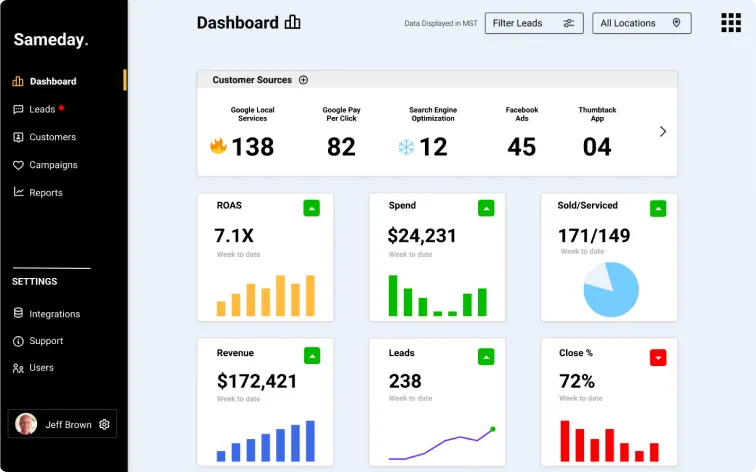
Sameday connects to ServiceTitan, Jobber, Housecall Pro, Service Fusion, and FieldEdge. The integration is two-way: the AI reads live availability from your FSM during the call so it never offers a slot that is already taken, and it writes the completed booking back with full job details the moment the call ends. Your dispatcher sees it on the board alongside every other job, with no indication it was booked differently.
For a full walkthrough of how that integration is set up, including field mapping and testing before going live, see our guide on voice AI field service integration.
How do I choose an answering service for my HVAC business?
Once your FSM is in place, the next question is what handles your phones when your team cannot. The platform you pick for scheduling and dispatch does not help you here; that decision is separate, and it is worth getting right. A poor answering setup means jobs that never enter your FSM at all. These are the things that actually matter when comparing options.
- FSM integration. A service that emails you a message is barely better than voicemail. It needs to book directly into your dispatch board in real time.
- HVAC call knowledge. A no-heat emergency in January is different from a quote request for a new system. The agent or AI needs to triage correctly and collect the right details for each job type.
- After-hours coverage. Most missed HVAC calls happen outside business hours. A nine-to-five solution only solves part of the problem.
- Spanish-language capability. If your service area includes Spanish-speaking customers, bilingual support meaningfully improves booking rates. Our post on Spanish-speaking AI receptionists for home service contractors covers how to evaluate this when comparing providers and making a final decision.
- Booking rate data. Ask for the provider's actual booking rate across their customer base, not an estimate. A service that answers calls without converting them into booked jobs is not solving your revenue problem.
- Call recordings. Access to recordings and outcome summaries lets you catch issues early and improve over time without relying solely on the provider's own reporting.
Not every HVAC answering service is built for the trades. Generic virtual receptionist services often struggle with technical job types, cannot triage emergencies correctly, and have no connection to field service software. The result is messages that pile up in an inbox rather than jobs that land on your dispatch board. The criteria above filter out options that look good on a pricing page but create more work for your team in practice every day.
A best HVAC answering service should book the job, create the record, and update your dispatch board before the call ends. If it cannot do that, it is not the right tool for a trade business running on tight margins and seasonal peaks.
How does AI phone answering fit into an HVAC tech stack?
Your software stack works in two layers.
The first is your FSM: scheduling, dispatch, invoicing, and customer records.
The second is everything that feeds jobs into it, and the most important part of that is your phone. Most HVAC businesses invest in the first layer and leave the second to chance, relying on a CSR team that clocks out at five or an answering service that takes messages. The result is that a real share of every day's inbound calls never becomes a booked job, and your FSM never knows those calls happened at all. That revenue is simply gone.
A Voice AI answering service with CRM integration connects both layers. When a customer calls after hours or during a surge, the AI answers, collects the job details, checks real-time availability, and books directly into your FSM. Your dispatcher sees it on the board the next morning, fully filled in.
It also removes a common source of data inconsistency. Different people handling calls differently means patchy customer records. An AI captures the same fields every time and writes them to your FSM in a consistent format, which pays off in cleaner dispatch and better technician prep on every job.
For businesses building a more formal call handling structure around this and wanting to scale it properly, our guide on virtual call center setup for home service companies covers how to design that layer from scratch, including how to handle escalation and after-hours routing effectively alongside your existing team.
Does AI appointment booking actually work for HVAC?
Yes, when it is set up correctly. The AI needs to understand HVAC job types, collect the right details for each one, and read your live availability before offering a time slot. A system that books into a generic calendar and syncs back later creates double-bookings and missing job details. A properly configured system reads your dispatch board during the call and writes the confirmed booking back immediately.
Sameday handles emergency triage, maintenance scheduling, quote requests, and membership sign-ups, each with the specific fields your tech needs on arrival. Our step-by-step guide to AI appointment setting for HVAC businesses walks through how to configure each call type correctly for your specific operation.
Stop losing calls while your team is on the job
Choosing HVAC software in 2026 is about matching the tool to where your business is right now, not where you hope to be in three years. Jobber and Housecall Pro cover most small teams well. FieldEdge suits accounting-heavy shops. Service Fusion fills the mid-tier gap. ServiceTitan earns its cost at scale but is overkill for a small crew.
Whichever platform you choose, it only manages the jobs that made it into the system. The calls that never converted are invisible to it. That is a separate problem, and it needs a solution at the front of your operation, before your FSM is ever involved.
An HVAC specialty answering service like Sameday is built for the trades and connected to your FSM is what keeps those calls from becoming lost jobs.
Rob Greer, COO of Rove Pest Control, put it this way: "We just had our 2nd week in a row of zero missed Google Local Services calls. This is pretty cool to see since implementing Sameday."
Book a free demo and our team will walk you through how it works alongside the platform you are already running. There is no generic script; the walkthrough is built around your trade, your FSM, and how your team actually handles calls today.


.svg)
.svg)