
Voice AI field service integration: complete setup guide
Think about the last time you actually called a business to get something done. Not a chatbot, not a form, but a real call. Homeowners dealing with a broken furnace, a burst pipe, or storm damage still pick up the phone. It is the fastest way to know if someone can help them today.
Research by Invoca found that 27% of those calls to home services businesses go unanswered, and phone leads in home services convert at 46% on the call - the highest rate of any industry analyzed. That gap between the calls coming in and the calls actually being handled is where a lot of contractor revenue quietly disappears.
Voice AI for home services and HVAC closes that gap. But the difference between a system that just picks up and one that actually books jobs lies in how well it connects to your field service management software. This guide covers exactly that: How the integration works, which setup method fits your business, and how to get it right from day one.
TLDR
Connecting a Voice AI answering service to your field service management software lets your business answer every call, book appointments directly to your dispatch board, and update customer records automatically. It works 24 hours a day, without adding headcount.
This guide covers how the integration works, which connection methods to use with platforms like ServiceTitan, Jobber, and Housecall Pro, and how to set it up correctly from day one. Contractors in HVAC, plumbing, roofing, and other trades use this setup to stop missing after-hours calls and capture more revenue from the marketing spend they are already making.
Why field service businesses need more than just an answering service
Most traditional answering services can take a message. That message then needs to be re-entered into your CRM, matched to an existing customer record, scheduled on the dispatch board, and confirmed back to the customer. Each handoff is a point where information gets lost or delayed.
A good AI phone answering system does something different. It reads from and writes to your FSM platform in real time during the call. When a customer calls and the AI identifies them by phone number, it pulls their service history. When it books the appointment, that job goes directly into your dispatch board. No re-entry. No lag. No risk of a double-booking.
This is the difference that matters. A voice agent that books into a separate system and syncs back later creates liability. If your FSM doesn't show real availability in real time, the AI will offer time slots that don't exist.
How voice AI integrates with field service management software
Before getting into setup steps, it helps to understand how data flows between a Voice AI for home services and your FSM platform.
What the AI reads from your FSM:
- Customer records and service history (matched by caller phone number)
- Technician availability and dispatch board slots
- Business units, job types, and service areas
- Membership status and account notes
What the AI writes back to your FSM:
- New customer records for first-time callers
- Booked appointments with job type, address, and arrival window
- Call logs with duration, transcript summary, and outcome
- Follow-up tasks for unsold estimates or membership renewals
This two-way sync is what makes a home services AI agent genuinely useful rather than just a fancy voicemail. When the AI can see that Tuesday afternoon is fully booked, it won't offer it. When a returning customer mentions their last service call, the AI already knows the details.
AI Integration methods: which one is right for your business?
There are three main ways to connect voice AI to your field service software. The right choice depends on your platform, your technical resources, and how tightly you need the systems to work together.
1. Native or official API integration
This is the most reliable option for platforms that support it. Sameday, for example, is an official ServiceTitan partner. The connection uses ServiceTitan's API to create jobs, check availability, look up customers, and write back results in real time. No middleware, no sync delays.
If you are running ServiceTitan, FieldRoutes, Service Fusion, Jobber, or Housecall Pro, check whether your AI receptionist has a native integration listed in the platform's app marketplace. Official partnerships mean the integration has been tested, supported, and kept up to date.
2. Middleware connections via Zapier or Make
For businesses on platforms without a native connector, or where a specific workflow needs to be customized, tools like Zapier and Make can bridge the gap. This approach works well for:
- Triggering follow-up tasks when a call ends without a booking
- Syncing call outcome data to a CRM field not covered by the native connector
- Connecting the voice AI to ancillary tools like marketing platforms or review request systems
The tradeoff is latency. Middleware connections are not always real-time, which can create conflicts on high-volume days. For core booking functions, a direct API integration is preferable.
3. Custom API or webhook integration
Larger operations with development resources may build a custom integration that maps specific voice interaction outcomes to specific FSM fields and triggers. This gives you full control over data mapping, deduplication logic, and escalation rules. Most businesses don't need this level of customization to get significant value from a virtual receptionist, but it is available as you scale.
Step-by-step: How to set up your voice AI field service integration
Step 1: Audit your current call and CRM workflow
Before connecting anything, map out what is happening today:
- Which calls are being missed, and when? (After hours, lunch, peak surge?)
- What information does your team capture on a call before booking?
- What fields in your FSM are currently filled in manually after calls?
- Are there duplicate customer records from inconsistent data entry?
This baseline tells you where the AI will have the most impact and what data fields need to be mapped correctly from day one.
Step 2: Choose your FSM integration method and confirm prerequisites
Log into your FSM platform and confirm:
- API access is enabled for your account (some platforms require a specific tier)
- You have admin permissions to authorize third-party connections
- Your job types, business units, and service areas are accurately set up in the FSM
For ServiceTitan specifically, Sameday's official partnership means setup uses secure API authentication and the connection is configured without custom development. You authorize access, and the connector handles the rest. Learn more about the Sameday integrations.
Step 3: Map call data to FSM fields
This step determines the accuracy of everything that flows into your system. For each type of call the AI will handle, define the mapping:
Start with your five to ten most common call types. Add more as you build confidence in the data quality.
Step 4: Configure the voice AI's call logic
The AI phone agent for home services needs to know how to handle different scenarios.
Work with your provider to configure:
- Inbound booking calls: The AI checks availability, offers time slots from your live dispatch board, and confirms the appointment
- Emergency calls: A defined escalation path to notify the on-call technician via text or call transfer
- Returning customer calls: The AI greets the caller by name and references their last service
- Calls outside service area: A clear, helpful response that doesn't book a job your team can't fulfill
- Complex or upset callers: A smooth handoff to a live CSR, with all the context already collected so the customer doesn't repeat themselves
For a deeper look at how this is applied specifically in HVAC and plumbing businesses, see our guide on how to use a Voice AI answering service with CRM integration.
Step 5: Test your AI agent with real call scenarios before going live
Run a structured test phase before routing live customer calls through the system:
- Call in as a new customer requesting a common service type and confirm the job appears correctly in the FSM
- Call in as a returning customer and verify your record is matched by phone number
- Request an appointment during a fully booked time slot and confirm the AI does not offer it
- Simulate an after-hours emergency and check that the escalation path triggers correctly
- Attempt a call for a service type outside your configured job types and verify the fallback response
For more tips on how to improve your AI agent read our guide on AI receptionist prompting.
This test phase typically takes less than a day. Catching mapping errors here prevents bad data from entering your FSM at scale.
Step 6: Set up outbound and follow-up automations
Once inbound booking is running cleanly, you can layer on outbound workflows. An AI receptionist for contractors can also:
- Send appointment reminders by SMS before a scheduled visit
- Follow up on unsold estimates after a defined number of days
- Call customers with expiring memberships or overdue maintenance
- Conduct post-service satisfaction calls and send review request links
Sameday handles all of these as part of its AI CSR and AI Sales Agent capabilities, with call outcomes and conversation summaries logged back to ServiceTitan automatically.
What do Voice AI field service integrations look like for specific trades?
Voicebot for HVAC
HVAC contractors deal with call surges that are hard to predict. When temperatures spike, call volume can overwhelm even well-staffed offices. An AI receptionist with ServiceTitan integration handles overflow without a hold queue, books emergency calls at any hour, and routes true emergencies to the on-call tech with a text notification. Seasonal maintenance reminders and tune-up bookings can also be handled outbound without any manual effort from your CSR team.
Plumbing AI phone answering
Emergency plumbing calls are high-intent and time-sensitive. Research from InsideSales.com shows leads contacted within 5 minutes are 100x more likely to convert than those reached after 30 minutes. An AI answering service for plumbers makes sure every call - including the burst pipe at 9 PM - is answered and booked before the homeowner calls your competitor. The AI also collects detailed problem descriptions that help your tech arrive prepared.
Roofing answering service
Roofing companies often see call surges following storms, when a well-staffed office still can't keep up. Voice AI handles the volume, qualifies each call by service type, and books inspection appointments directly to the dispatch board. Outbound follow-up on estimates, which is critical in roofing where close rates vary widely, can be automated through the same system.
For more on how booking rates improve across trades, see our post on how AI answering services increase contractor booking rates.
What should you look for in a voice AI platform for field service?
Not every voice AI tool is built for the trades. A general-purpose AI assistant may handle basic questions, but home services businesses need a system that understands job types, dispatch logistics, and service area rules.
When evaluating platforms, check for:
- Native FSM integrations: Does the platform have an official partnership with your field service software, or does it rely solely on Zapier?
- Real-time availability sync: Does the AI read live dispatch board data during the call, or does it offer generic time windows?
- Two-way data flow: Does it write back to your FSM (job creation, notes, customer records), or just read from it?
- Escalation handling: How does the system hand off complex or upset callers, and does it preserve the context already collected?
- Booking rate transparency: What is the actual booking rate across the platform's customer base? Ask for real numbers, not estimates.
For a detailed breakdown of how different platforms stack up for ServiceTitan users, see our comparison of AI voice platforms that integrate with ServiceTitan.
How do you know if your voice AI integration is working?
Once live, track these metrics weekly for the first 30 days, then monthly after that:
Call handling metrics
- Call answer rate (target: 95%+)
- Calls handled end-to-end by AI vs. transferred to a CSR
- Average call duration
- After-hours call volume and booking rate with automated appointment scheduling
FSM data quality metrics
- Percentage of AI-booked jobs with complete fields populated
- Duplicate customer records created (should be near zero with phone number matching)
- Jobs requiring manual correction after AI booking
Business impact metrics
- Booking rate week-over-week before and after AI implementation
- Revenue from after-hours and weekend bookings
- No-show rates on AI-booked appointments vs. manually booked
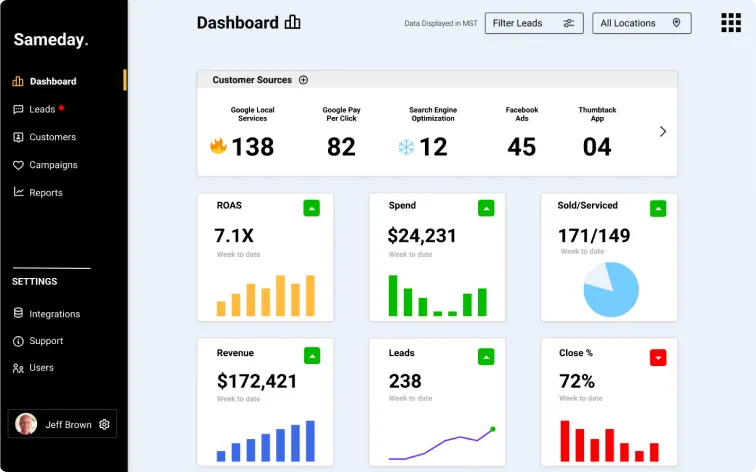
Sameday provides a booking rate dashboard showing real performance across all calls. Customers can review call recordings and outcomes to refine the AI's call logic over time.
Don't miss our guide on choosing the best virtual receptionist for home remodeling businesses.
Will voice AI replace your CSR team?
No, and it shouldn't try to. The businesses getting the most value from voice AI use it to handle call volume that their team couldn't absorb anyway: after-hours calls, overflow during peak demand, and routine booking calls that don't require sales judgment. Your CSR team then has more time for the calls that benefit from a human: complex estimates, customers with complaints, and high-value accounts that need relationship management.
Sameday customers report their AI booking rates match or exceed some of their human CSRs on routine calls.
Is there a right time to set up voice AI integration?
The best time is before your next busy season, not during it. A 30-day setup and test window before a seasonal surge gives you time to refine field mappings, test escalation paths, and build confidence in the system before call volume spikes.
For a broader look at how to evaluate your options, see our comparison of the top AI phone answering systems for home services.
Setup your AI Agent with field service integration
Every missed call in home services is a job that was already paid for through marketing, search ads, or word of mouth. The phone is still the highest-converting lead channel in the industry. A Voice AI answering service with CRM integration that connects directly to your FSM platform books the job, creates the record, notifies the tech, and sends the confirmation, all before the customer hangs up.
Getting the integration right matters. Real-time dispatch board sync, accurate field mapping, and clean escalation paths are what make it work at scale. When those pieces are in place, the system runs in the background, quietly booking jobs your team would have missed.
Sameday is an official ServiceTitan partner and integrates with Jobber, Housecall Pro, FieldRoutes, and Service Fusion. If you want to see how the setup looks for your specific workflow, book a demo and one of our team members will be happy to walk you through it.



.svg)
.svg)